

Download JustZIPit – Free ZIP Compression & Extraction Tool for Windows
Simple, Fast, and Free: Why JustZIPit Stands Out in File Compression
In a world full of bloated software and complex interfaces, JustZIPit offers a refreshing alternative for users who value speed, simplicity, and efficiency. Designed exclusively for Windows systems, this lightweight tool allows you to compress and extract ZIP files in just a few clicks, making it ideal for everyday file management tasks. Whether you're sending a large document via email, backing up project files, or organizing your digital library, JustZIPit streamlines the process without requiring technical knowledge. Despite being first released in 2006 and last updated in 2008, the software remains remarkably functional and stable, proving that sometimes, less is more.
One of the standout features of JustZIPit is its minimal footprint. Unlike modern file compression tools that demand significant system resources, JustZIPit uses very little memory and disk space, making it perfect for older or low-end machines running Windows 98 and earlier versions. Its simplicity doesn’t mean it lacks power—JustZIPit supports standard ZIP format compression and extraction, ensuring compatibility with virtually all other ZIP utilities.
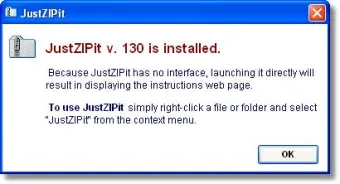
The interface is clean and intuitive, with no unnecessary menus or pop-ups. You simply right-click a file or folder, select "JustZIPit," and choose to compress or extract. No installation is required—just download, run, and go.
For users who prefer a no-frills, reliable tool that just works, JustZIPit is an excellent choice. It’s especially popular among users in the United States, Canada, and Italy, where it has consistently been downloaded over the years. With more than 7,600 downloads since 2006, it’s clear that many users appreciate its straightforward functionality. If you’re tired of complicated software that slows down your computer, give JustZIPit a try—it’s a free, secure, and fast solution for your ZIP needs.
Key Features and How to Use JustZIPit Effectively
JustZIPit may not boast an extensive feature list, but what it lacks in bells and whistles, it makes up for in reliability and ease of use. Here are the core features that make this tool a favorite among power users and beginners alike:
- One-Click Compression & Extraction: Right-click any file or folder and select "JustZIPit" to compress or extract with no setup required.
- Lightweight & Fast: The tool runs in the background with minimal CPU and memory usage, ideal for older systems.
- ZIP Format Support: Full compatibility with standard ZIP archives, ensuring seamless sharing across platforms.
- No Installation Needed: Portable version available—just download and run. No registry changes or leftover files.
- Open Source & Free: Completely free to download and use, with no ads, spyware, or trial limitations.
- Supports Multiple File Types: Works with documents, images, videos, and more—perfect for backup and transfer tasks.
Using JustZIPit is incredibly simple. After downloading the executable file, simply double-click it to launch the tool. Once open, you can either drag and drop files into the interface or use the built-in file browser.
To compress, select your files, click "Create ZIP," and choose a destination. For extraction, right-click a ZIP file and choose "Extract with JustZIPit." The tool automatically detects the archive and begins decompression instantly. There’s no need to navigate through complex settings or learn a steep learning curve.
For advanced users, JustZIPit also supports command-line operations, allowing automation through batch scripts. This makes it a valuable tool for system administrators or developers who need to integrate file compression into workflows. Despite its age, the software remains functional and secure, especially when used from trusted sources. Its continued popularity is a testament to its reliability and efficiency in a niche that’s often overlooked by modern software developers.
Compatibility, Installation, and Best Practices
JustZIPit is specifically designed for Windows 98 and earlier operating systems, which sets it apart from most modern file compression tools. While this may seem limiting, it actually makes the software ideal for users still running legacy systems or those who prefer minimalism over compatibility with the latest Windows versions. The tool is not available for Mac, Android, or iOS, so it’s essential to confirm your system before downloading.
Installation is straightforward and optional. Since JustZIPit is a portable application, you can run it directly from a USB drive or desktop folder without installing it. This makes it perfect for use on shared or restricted computers. If you do choose to install, the process is quick and leaves no traces behind—no registry entries, no startup services, and no leftover files. This level of portability is rare in today’s software landscape, where most apps assume permanent installation.
For best results, always download JustZIPit from official or trusted repositories to ensure you’re getting the clean, malware-free version. Avoid third-party download sites that may bundle unwanted software. Once downloaded, keep the executable in a dedicated folder for easy access. To update the tool, check the official website periodically—though given its last update in 2008, major updates are unlikely. However, since the ZIP format remains stable, the software continues to function flawlessly.
Best practices include using JustZIPit for small to medium-sized archives (under 1GB) to avoid performance issues. For large files or complex archives, consider pairing it with a more robust tool like 7-Zip or WinRAR. Still, for everyday use—backing up documents, sending files via email, or organizing downloads—JustZIPit delivers consistent, reliable performance.
Frequently Asked Questions (FAQ)
Is JustZIPit safe to download and use?
Yes, JustZIPit is a safe and secure tool. It’s open-source, free of malware, and has been trusted by thousands of users since 2006. Always download from official or reputable sources to avoid bundled software.
Can I use JustZIPit on Windows 10 or Windows 11?
While JustZIPit was designed for Windows 98 and earlier, it often runs on modern Windows systems via compatibility mode. However, it’s not officially supported on Windows 10 or 11, so results may vary. For newer systems, consider 7-Zip or WinRAR.
Does JustZIPit support password protection for ZIP files?
No, JustZIPit does not support password-protected ZIP archives. If you need encryption, use tools like 7-Zip or WinRAR, which offer stronger security features.
Is JustZIPit free to use?
Yes, JustZIPit is completely free. There are no trial periods, subscriptions, or hidden costs. It’s open-source and available for personal and commercial use without restrictions.
Can I extract RAR or other archive formats with JustZIPit?
No, JustZIPit only supports ZIP files. For RAR, 7Z, or other formats, use 7-Zip or WinRAR, which are better equipped for multi-format support.
Final Verdict: A Timeless Tool for Simple ZIP Management
Despite its age and limited platform support, JustZIPit remains a solid choice for users who need a lightweight, fast, and free ZIP tool for Windows. Its no-nonsense interface, minimal system requirements, and reliable performance make it a standout in the crowded field of file compression software. While it lacks modern features like password protection or multi-format support, it excels at what it was designed to do: compress and extract ZIP files with ease.
If you’re running an older system, prefer a portable app, or simply want a no-frills tool that doesn’t slow down your computer, JustZIPit is worth downloading. It’s a perfect example of how simplicity can outlast complexity. For users seeking advanced features, pairing it with a more powerful tool like 7-Zip may be ideal—but for basic ZIP tasks, JustZIPit delivers exceptional value.
Download JustZIPit today and experience the power of minimalism in file management. It’s free, secure, and ready to use in seconds. Whether you're a student, professional, or casual user, this lightweight tool is a reliable companion for your daily file tasks.
- One-click ZIP compression and extraction
- Lightweight and portable
- Free and open-source
- Supports standard ZIP format
- No installation required







